
Curtain MonGuard screen watermark features

Each feature below lists its edition, platform and any limits, based on the product documentation. Windows and macOS do not have identical features, so check each label.

Full-screen watermark

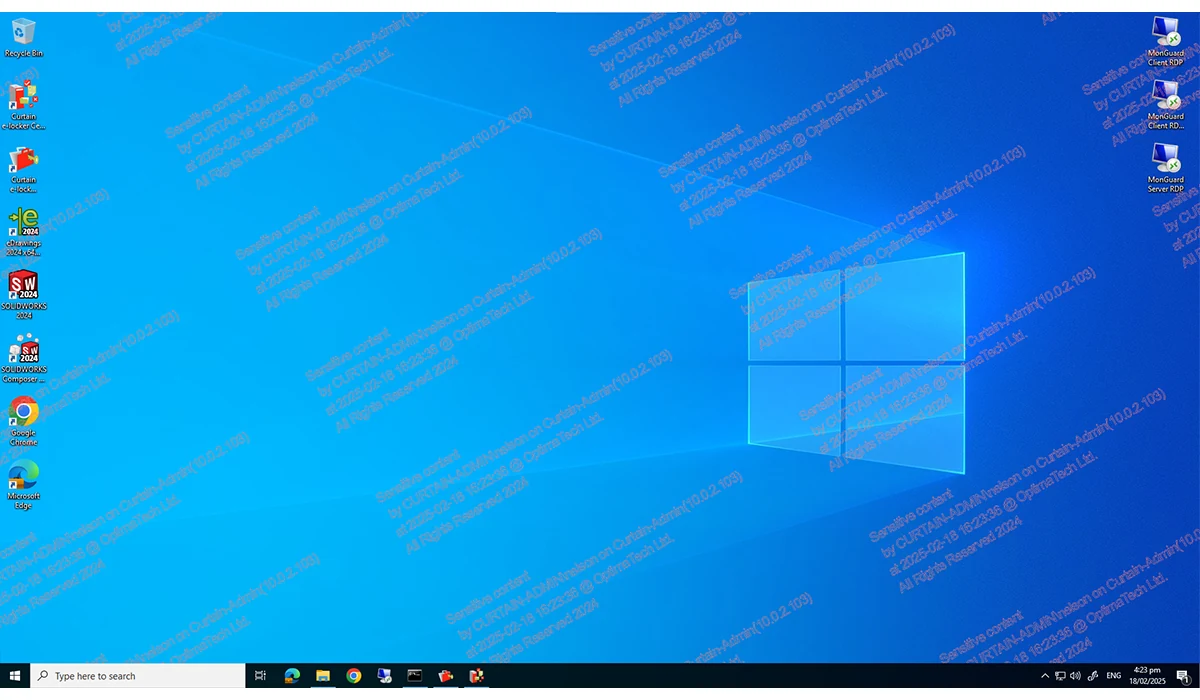
Shows a watermark across the user’s whole desktop, with details such as computer name, date and time.
Edition
Free and paid
Platform
Windows, macOS
Limits and conditions
User name and IP address content are paid-only.
Curtain MonGuard full-screen watermark on a Windows desktop
Full-screen watermark (software screenshot, Windows) · View full image

Application watermark

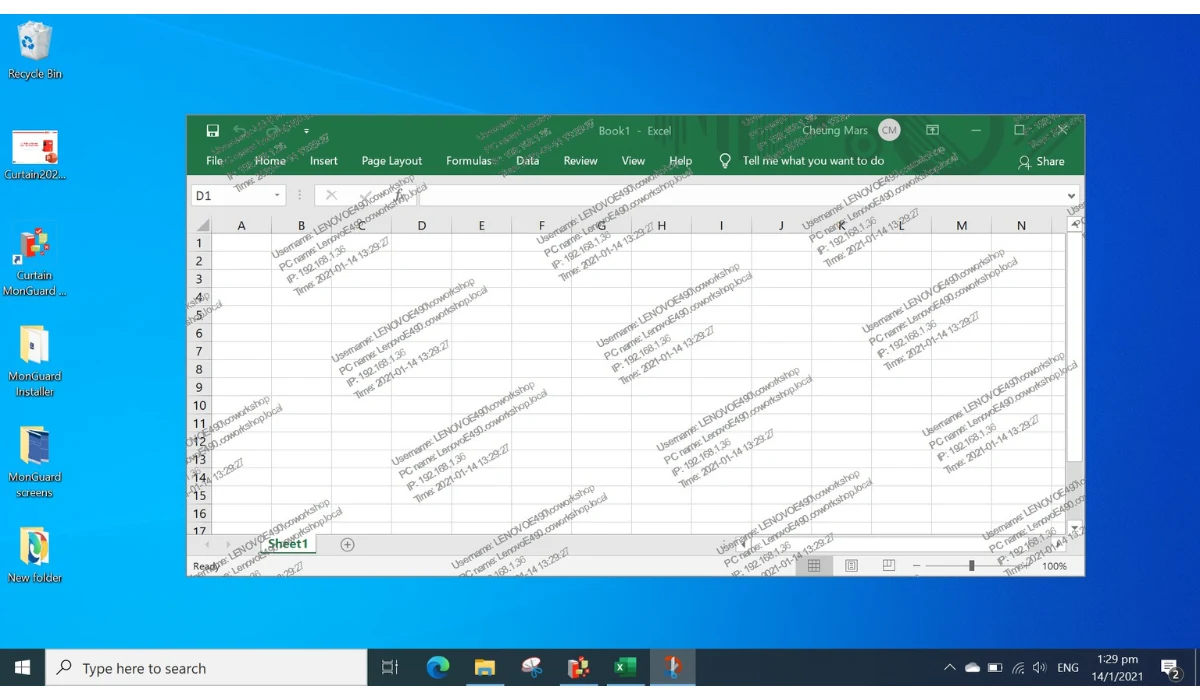
Shows the watermark only in the windows of selected applications, leaving other programs untouched. Useful when only certain systems need protection, such as CCTV or payment systems. The product information states support for more than 500 applications.
Edition
Free and paid
Platform
Windows (currently confirmed)
Limits and conditions
Application watermark: currently confirmed on Windows; public information for macOS currently confirms the full-screen watermark only.
Curtain MonGuard application watermark inside a spreadsheet window
Application watermark (software screenshot, Windows) · View full image

Custom watermark content

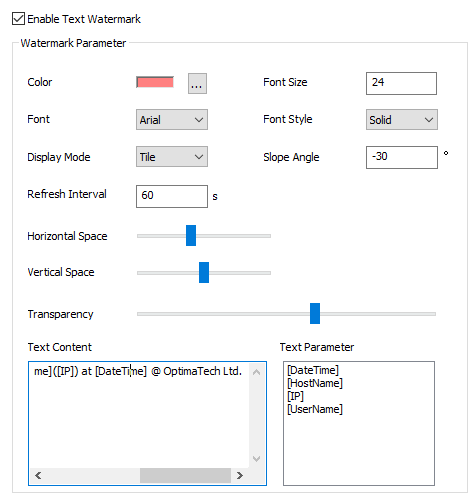
Administrators choose what the watermark shows, including fixed text such as a company or department name. Clearer content makes a leaked image easier to identify.
  • Free: fixed text, date and time, computer name
  • Paid adds: user name, IP address
Edition
Basic content: free and paid; user name and IP address: paid only
Platform
Windows; ask about macOS content options when you apply
Limits and conditions
Available details depend on edition and settings.
Curtain watermark settings; the lower half shows watermark text content and parameters
Watermark content settings (software screenshot) · View full image

Watermark appearance and auto colour

Administrators can adjust colour, font, size, spacing, display mode, angle and transparency. Auto Color Selection picks a colour that contrasts well with the screen content.

  • Appearance options follow the software interface
  • Auto Color Selection: paid only
Edition
Appearance: free and paid; Auto Color Selection: paid only
Platform
Windows; ask about macOS support when you apply

Watch the automatic colour adaptation demo

Curtain watermark settings; the upper half shows colour, font, size, display mode and angle
Watermark appearance settings (software screenshot) · View full image

Central management

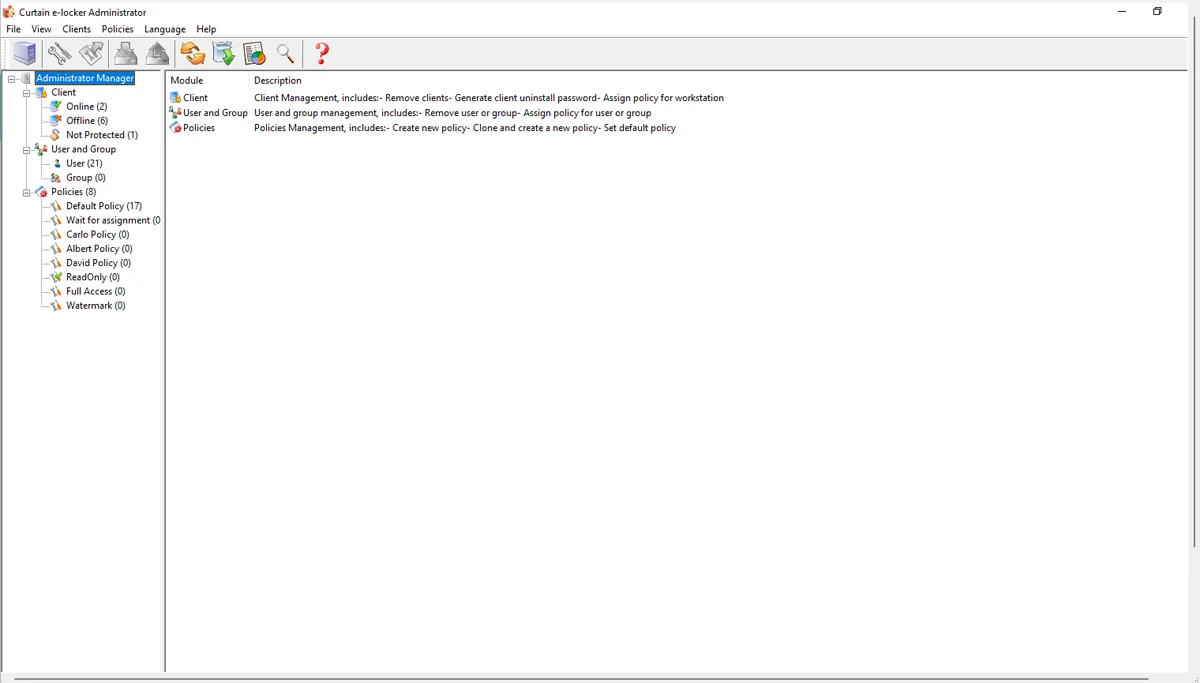
Administrators create policies such as watermark rules and password requirements on the admin server and deploy them to every computer, so the whole organisation uses consistent settings.
  • Admin delegation: paid only
  • MSI bulk installation: paid only
Edition
Central management: free and paid
Platform
Admin server: Windows
Limits and conditions
Admin delegation and MSI bulk installation are paid-only.
Curtain admin console
Admin console (software screenshot) · View full image

Not sure which features fit your setup?

Choose “I need a recommendation” when you apply and the sales team will follow up based on your platforms and device count.

Request Free Version / Trial

Active Directory / LDAP integration

Works with Active Directory and LDAP directory services to manage users and deployment in one place.
Edition
Free and paid
Platform
Admin server: Windows
LDAP and Microsoft Active Directory logos
Feature illustration · View full image

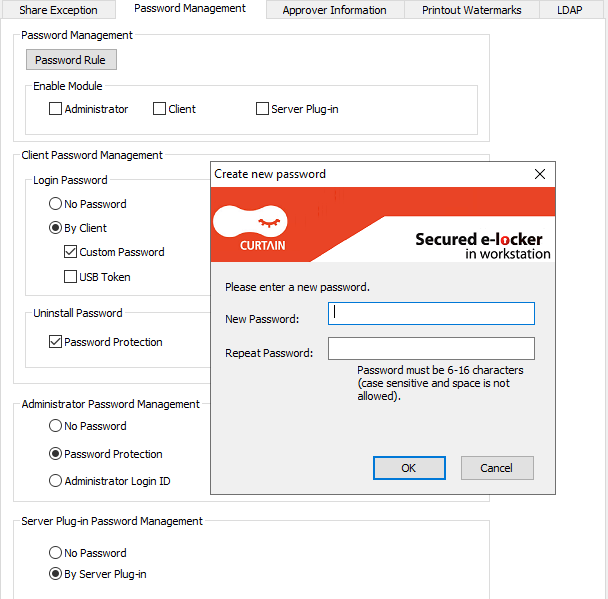
Uninstall password and password management

A set password is required before the client can be uninstalled, reducing the risk of accidental or deliberate removal. Password management is also included.
Edition
Paid only
Platform
Windows; ask about macOS support when you apply
Curtain password management settings
Password management settings (software screenshot) · View full image

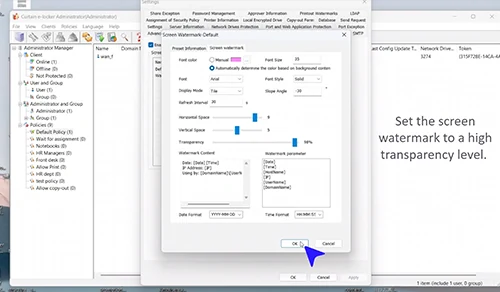
Invisible watermark (high transparency)

Watermark transparency can be set as high as 98%, so it is barely visible in daily use and does not get in the way of work. If a screen image leaks, image adjustment may reveal the watermark details.
Edition
Ask the sales team when you apply
Platform
Ask the sales team when you apply
Limits and conditions
Watermark recognition depends on the settings, capture clarity and any later image processing; we recommend evaluating it in your actual environment.

Watch the invisible watermark video

High-transparency watermark settings in the Curtain admin console
High-transparency watermark settings (software screenshot) · View full image

Dot Matrix Watermark

Overlays a pattern of tiny dots that encode information on the screen. This is a different technique from the high-transparency watermark. The product comparison lists the dot matrix watermark as a paid feature.

  • Not included in the free version
  • Availability, edition and platform are confirmed by the sales team
Edition
Paid (availability confirmed by the sales team)
Platform
Ask the sales team when you apply
Limits and conditions
Watermark recognition depends on the settings, capture clarity and any later image processing; we recommend evaluating it in your actual environment.

Windows and macOS support

Clients run on Windows and macOS; the admin server runs on Windows. Windows can show full-screen or application watermarks; current information for macOS confirms the full-screen watermark only.
Edition
Free and paid
Platform
Windows, macOS
Limits and conditions
See the Windows & macOS page.

See Windows and macOS support details

Curtain MonGuard illustration: laptop and shield
Product illustration · View full image

More information

Multilingual interface

The client interface can switch between several languages, including English, Español, Avañe’ẽ (Guarani), Português, 繁體中文, 简体中文 and Türkçe.

Technical support and software updates

Technical support and software updates are part of the paid edition.

Free and paid editions

Both editions may be used commercially. Key differences are below; see the Free vs Paid page for the full comparison.

Free

  • Screen watermark: fixed text, date and time, computer name
  • Full-screen watermark; application watermark (currently confirmed on Windows)
  • Conditional watermark display
  • Active Directory integration
  • Self-protection and central management

Paid adds

  • User name and IP address watermarks
  • Password management and uninstall password
  • Auto Color Selection
  • Admin delegation
  • MSI bulk installation
  • Technical support and software updates
  • Dot matrix watermark (availability to be confirmed)

View pricing and editions

Want to evaluate screen watermarks in your organisation?

Use the on-site form to request the free version or explore a trial of the paid edition.